

Chrome & Edge
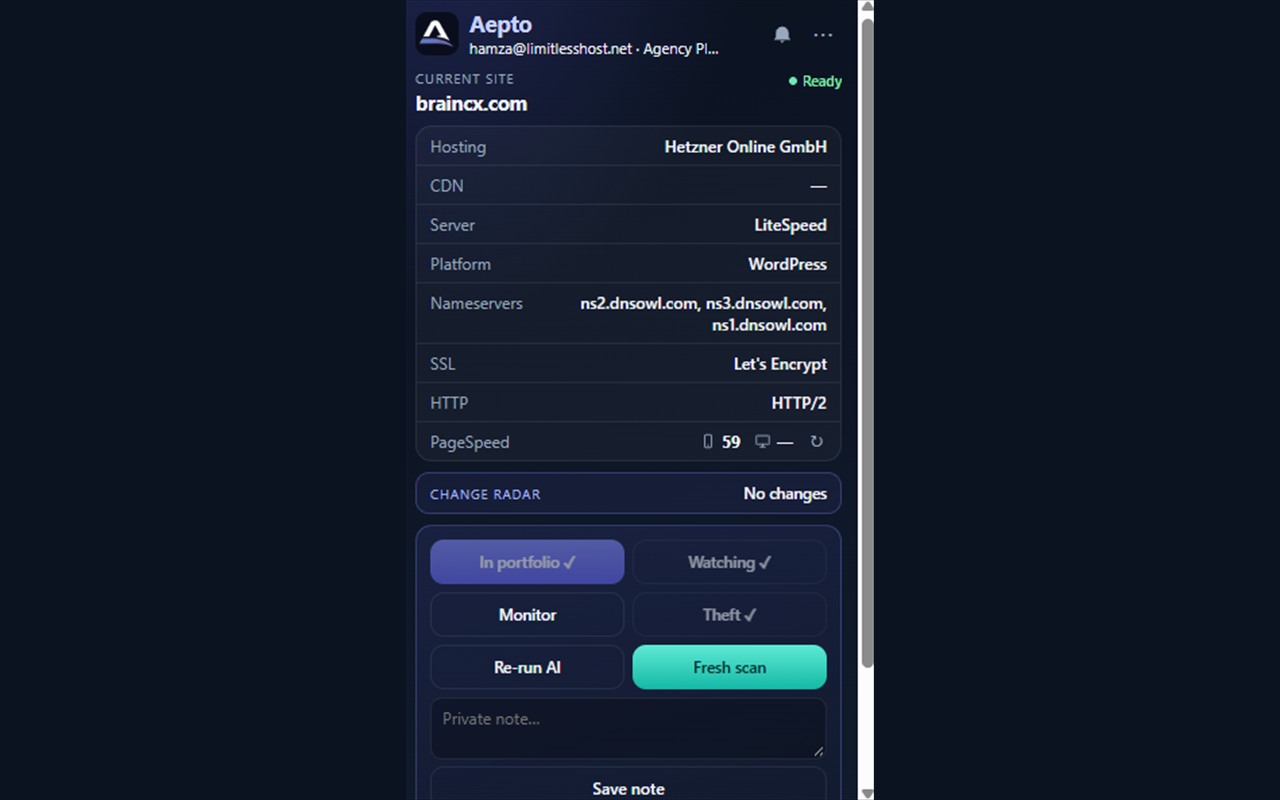
Aepto Tech Stack Detector shows hosting, CDN, CMS, server, nameservers, SSL, and HTTP version for the site in your current tab. Works in Google Chrome and Microsoft Edge. Scanning is free. Signing in unlocks portfolio actions.
Install from the Chrome Web Store or Microsoft Edge Add-ons, then pin the icon so it stays on your toolbar.
Add to Chrome
Get for Edge
Install
- Chrome: open the Chrome Web Store listing and click Add to Chrome.
- Edge: open the Edge Add-ons listing and click Get.
- Pin Aepto on the toolbar so the icon stays visible.
Scan a site (no account needed)
- Open any public website in a normal tab (HTTPS works best).
- Click the Aepto icon on the toolbar.
- Review the stack rows: Hosting, CDN, Server, Platform/CMS, Nameservers, SSL, and HTTP. Treat these as public clues - confirm anything important before you change hosting or DNS.
Sign in for account features
- In the popup, click Sign in free with Aepto and finish sign-in in the browser window that opens.
- On a free account, use Add to my free account when you want to keep a domain.
- On a paid plan, the popup toolkit can include:
- Add to portfolio
- Watch
- Monitor
- Theft Guard
- AI analyze
- PageSpeed (when shown)
- Fresh scan / Refresh scan
- Private notes with Save note
- Open the popup menu for Open Aepto dashboard, Billing & plans, Options, or Disconnect.
- In Options you can connect or disconnect Aepto, save settings, or reset to the production app URL if you were testing against a local server.
Revoke access
In Aepto, open your avatar menu, choose Connected apps, and click Disconnect for the Chrome extension. You can also choose Disconnect from the extension menu.
Also see the WordPress plugin and Claude connector. Building an integration? Chrome Connect notes for developers.
FAQ
Do I need an Aepto account to scan a site?
No. Click the toolbar icon on any public tab to see Hosting, CDN, CMS, nameservers, SSL, and HTTP version. Tech stack scanning is free without sign-in.
What does Sign in free with Aepto unlock?
Portfolio actions such as Add to portfolio, Watch, Monitor, Theft Guard, and AI analyze on paid plans. Free accounts can use Add to my free account to keep a domain.
Are scan results always accurate?
Results are public clues from the live page—confirm before changing hosting or DNS. Use Fresh scan or Refresh scan after the site changes.
How do I disconnect the extension from my account?
In Aepto: avatar menu → Connected apps → Disconnect for Chrome. Or use Disconnect in the extension menu.
Can I point the extension at a local Aepto server?
Developers can use Options to connect or reset to the production app URL after testing against a local server.
More answers: FAQ hub.